VoiceOver etiketine sahip kayıtlar gösteriliyor. Tüm kayıtları göster

Reminder: Apple to Preview "The Future of iOS and OS X" Tomorrow


Apple's World Wide Developer Conference (WWDC) starts Monday June 10th. At the event Apple will detail "the future of iOS and OS X." Apple is a leader in integrated accessibility with their VoiceOver screen reader and numerous other accessibility features such as Guided Access, Speak Selection, Zoom, and Assistive Touch. That being said Apple still needs to improve their accessibility features to remain a leader. New accessibility features have routinely been added to new versions of iOS. Last year, Apple added Guided Access along with other accessibility improvements. A new version of iOS is exciting not only because of the cool mainstream features but the lesser known, but no less important accessibility features that make the devices usable for so many. Make sure to visit The Assistive Technology Blog after the Keynote for all the iOS 7 and OS X accessibility news.

In the meantime check out my iOS 7 Wish List video below.

Kindle App For iOS Updated With VoiceOver Support


Today Amazon updated their Kindle iOS app with VoiceOver support. VoiceOver  is a gesture controlled screen reader for the iPhone, iPad, and iPod Touch designed to help the blind and visually impaired. The text-to-speech feature can benefit people with dyslexia as well. Amazon describes the new features as follows,
"Accessibility features make it easier for blind and visually impaired customers to navigate their Kindle libraries, read & interact with books, and more. Enable VoiceOver in your device settings to begin."
VoiceOver support for the Kindle app comes shortly after the Nook app was updated with VoiceOver support. Despite VoiceOver support it is possible that certain books may have accessibility issues that make them inaccessible. Irronically, the Kindle iOS app is now more accessible for the blind and vissually impaired than physical Kindles. Kindle for iOS is avalible as a free update in the App Store.

Click read more to view screenshots of the Kindle app.


Quizlet Flashcard App: Create, Share, and Study


Quizlet is a website where users can create, share, and study flashcards. Users can make a study set on the internet and then study them on a computer or using the free Quizlet iOS app. The app is compatible with iPhone and iPod touch. Teachers can also make a study sets for their classes. Quizlet also offers pre-made flashcard sets for popular vocabulary books, SAT vocabulary, and more. Flashcards can also include images to aid in studying. Once the study set is open you can view the terms in list mode or in flashcard mode. Watch the video above to learn more. Both modes include speak buttons which speak the terms in a high quality text-to-speech voice. Quizlet is compatible with Apple's VoiceOver. Click here to download the free app.


Click read more below to view screenshots of the app in action.


BrailleTouch App Allows Fast Braille Typing on iPhone


BrailleTouch is a new app for the iPhone and iPod Touch that allows users to type using braille. Click here to download the app. BrailleTouch is designed for the blind and visually impaired. The app uses the familiar six key braille and simple swipe gestures to enter text. The app is used in landscape with the devices touch screen facing away from you. Three of the six keys are on the left side and the other three are on the right side. By swyping with one finger you can add a space or delete a letter. BrailleTouch can also speak the characters and/or words as you type. BrailleTouch works well and is the first app of its kind but it cannot be used to replace the default keyboard for any other apps. This means that in order to use the text you typed using BrailleTouch you must copy and paste it into other apps. BrailleTouch is free to download and try but costs $19.99 to unlock the ability to copy and paste the text.

Click read more below to view screenshots of BrailleTouch.


iTunes 11 Feature Helps Visually Impaired Redeem Gift Cards


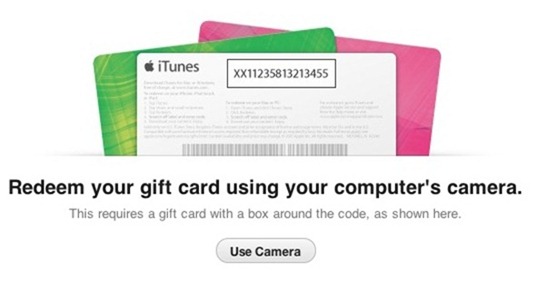
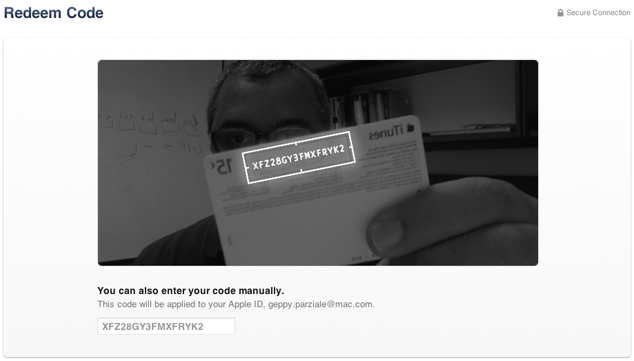
A feature in Apple's iTunes 11 allows you to scan a gift card code using your computer's camera. The feature is particularly intriguing for the blind, visually impaired and for dyslexics. While it may be inconvenient for most people to type the 16 digit code, it is impossible for users who are blind or visually impaired, and can be a struggle for some dyslexics. To use the feature position the gift card in front of the computer's camera. For people with visual impairments VoiceOver, Apple's built in screen reader on your Mac will help you frame the card in the picture. Then iTunes recognizes the code and credits the money to your iTunes account. This feature makes it possible for the blind and visually impaired to easily and independently redeem iTunes gift cards. Maybe this cool scanning feature will make its way to iOS in the near future.

Click read more below to view pictures of the scanning feature in action.